All-in-one Android cleaner and system manager with manual review
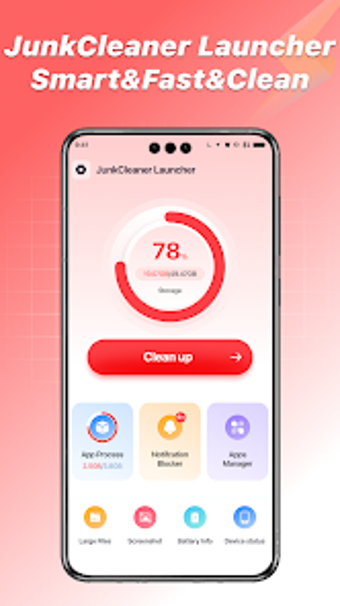
Manage storage and device health with JunkCleaner Launcher from Rachidsoft, a compact Android utility for maintaining performance and freeing space. The app scans device storage for cache, temporary files, and large items, provides a device information module, and monitors battery level and temperature in real time. It bundles notification organization and background app review alongside manual cleaning, giving users control to inspect every item before deletion. Designed for Android users facing limited storage or notification clutter, and who prefer to review deletions manually to avoid accidental data loss.
What does the app scan and remove?
The app targets accumulated storage clutter by scanning for junk, temporary, and cache files, and locating large media and extraneous screenshots for removal. Its file management tools present candidates for deletion and require manual selection so users keep control. In addition to storage cleanup, the tool exposes background app activity and groups notifications, while the system information module shows device hardware and software details to guide decisions.
Does it slow down your device during a scan?
The developer positions the app as a lightweight centralized hub that combines cleaning, app control, and system monitoring without a heavy system footprint. Because the tool is optimized for modern Android devices it can run scans alongside normal use and reports battery level, temperature, and charging status in real time. Expect scanning and monitoring to be local processes rather than cloud-dependent operations, reducing network overhead during maintenance tasks.
Is it safe to delete files with this tool?
Safety centers on the app's user-controlled cleaning workflow, which requires manual inspection of candidates before any deletion, reducing the risk of accidental removal. The tool also displays background app activity and device specifications so choices are informed. The developer notes the app may include advertisements as a monetization model; that element is separate from file operations and does not change the manual review requirement.
Do I need technical knowledge to operate the launcher?
User reception highlights a straightforward interface and effective identification of removable items, which helps casual users manage storage without technical training. The manual review flow balances accessibility and control, while device information and background app lists supply extra context for more experienced users. The developer's portfolio of similar system tools makes the app predictable for anyone familiar with utility-type applications.
Practical choice for cautious users, with one notable trade-off
The app is a practical option for Android users who want a single tool to manage storage, notifications, and device status while keeping tight control over deletions. Its manual review workflow and combined monitoring tools suit cautious operators who avoid automatic removals. The primary drawback is the presence of advertisements as part of its monetization model, which may affect the day-to-day user experience for some people.